- #springboot
- #microservices
- #sqs
- #dlq
Handling Failures in AWS: From SQS Dead-Letter Queues to Error Log Archiving
how to handle message processing failures with Amazon SQS and Spring Boot, configure retries and dead-letter queues, and use Lambda to archive related CloudWatch logs in S3 for troubleshooting.
Oct 21, 2026 • 6 min read
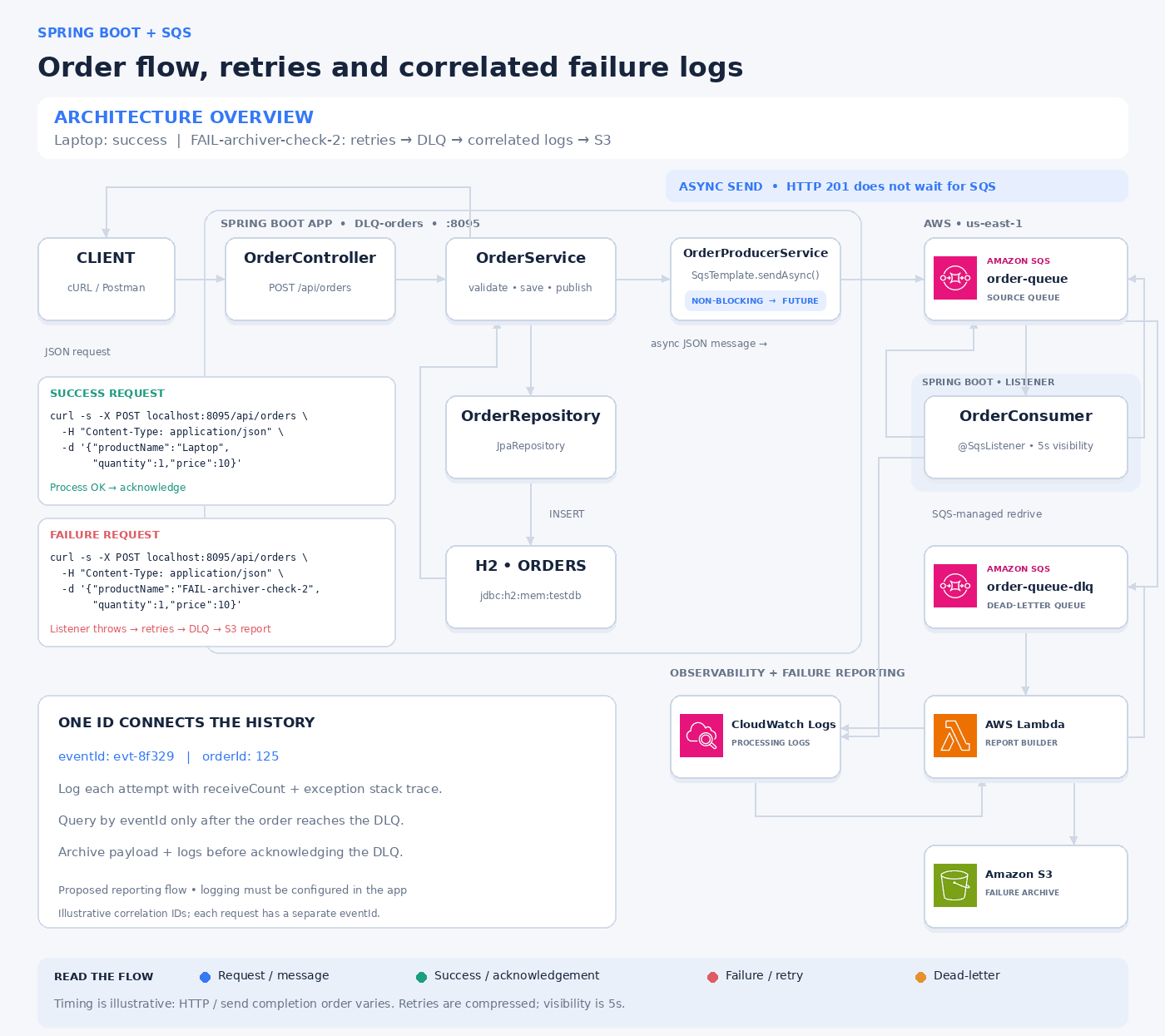
Lets First understand why queues and Dead-Letter Queues(DLQ)s are useful: Here above order API can accept an order without waiting for all downstream work to finish,which means decoupling the order-service from the other services. The queue buffers demand, separates producer and consumer lifecycles, and lets consumers recover after temporary problems. When processing an order, an unprocessable message may be received repeatedly, waste valuable computer resources, increase costs, and obscure useful signals. A DLQ isolates these cases so an operator or a separate workflow can examine them without a controlled failure path. Availability is something highly discussed in System Design and due to tons of reasons a service can go down without notice.
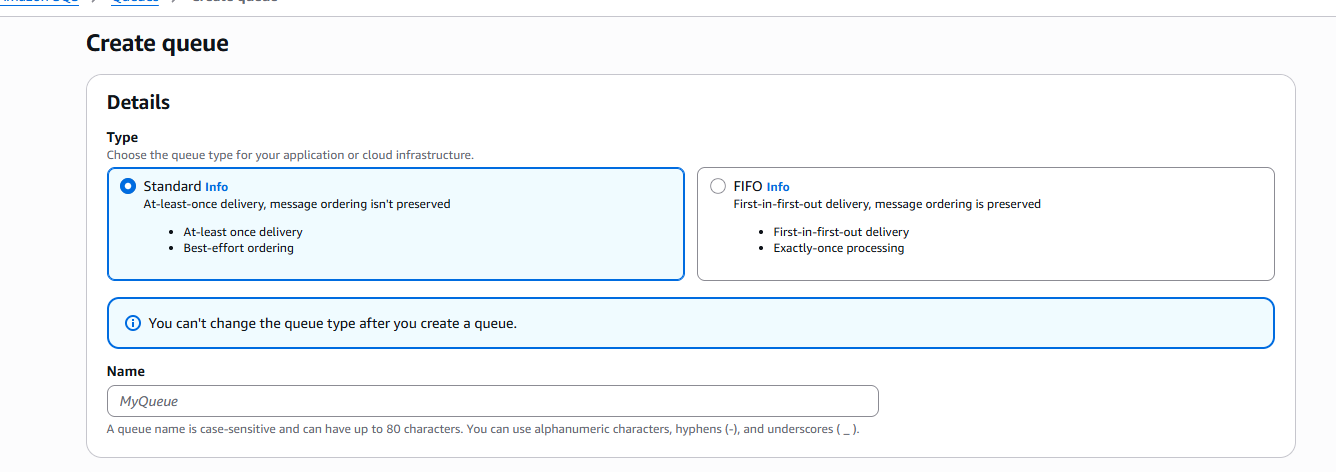
A dead-letter queue (DLQ) is a separate queue used to isolate messages that have failed after the configured receive threshold. In Amazon SQS there is no specific queue type called Dead Letter Queues. Only following two queue types available in SQS
- Standard Queue
- FIFO Queue(First in First Out Queue)
The source queue’s redrive policy names the destination DLQ and specifies maxReceiveCount.(Here set it as 10) SQS performs the movement ,so decoupling that Spring application does not need to send the failed message to the DLQ.
| Setting | Where | What it controls |
|---|---|---|
maxReceiveCount: 10 | Source SQS queue’s redrive policy | Maximum number of receives before SQS moves the message to the DLQ. |
messageVisibilitySeconds = "5" | @SqsListener in OrderConsumerService | Hides a received message for 5 seconds. If processing fails and the message is not deleted, it becomes available again when this period expires. Actual retry timing can vary. |
acknowledgementMode = "ON_SUCCESS" | @SqsListener | Acknowledges the message after consume() returns successfully, allowing it to be deleted. Rethrowing an exception prevents successful acknowledgement, allowing the message to be retried. |
table 01 : configurations of source queue
Source queue is acting as the queue awaiting processing and the DLQ as a work area for cases needing investigation. A DLQ is still a queue,to process the failed ones which are to be investigate further for the issues for transient errors or software bugs.
Here I have created one Dead letter queue and Source Queue as follows. As a rule of thumb, first you need to define the DLQ first and needs to use its ARN as the dead-letter queue for source queue.

A message can reach a DLQ because the consumer repeatedly failed, crashed, could not deserialize the payload, or did not delete it before visibility expired. SQS observes message delivery and deletion, not the meaning of a Java exception.
In this setup it deliberately simulate one predictable failure , when a product name containing FAIL causes the listener to throw an Illegal State Exception.Common use cases are order fulfilment, payment-event handling, email delivery, file conversion, webhook processing, and integration with external APIs.In each of the occation, replay must be idempotent, which means retrying a message must not charge twice.
A DLQ is most useful when someone or something owns the recovery process. Many Software requires different migrations and still need to keep legacy code for business purpose. Merely creating it and never inspecting or monitoring it leaves failures unresolved.Otherwise congratulations! you have created a mini DoS attack to your own service without spending a penny, because you have not observed the failure messages which blocks entire workflow.
Here are some of the causes which some messages may getting ended up failed for processing.
| Failure | Example | Likely response |
|---|---|---|
| Transient | A downstream API temporarily times out | Retry with appropriate backoff |
| Persistent data defect | A required business identifier is absent | Investigate or correct the event |
| Code defect | A new consumer release cannot handle a valid event | Fix the consumer, then replay |
| Configuration defect | Wrong endpoint or missing IAM permission | Correct the configuration |
| Capacity or timeout problem | Work takes longer than visibility | Adjust processing capacity or visibility |
| Partial business completion | Payment succeeded but acknowledgement failed | Use idempotency and reconcile before retry |
Retrying every second will not fix a permanently invalid message. Conversely, sending a transient failure to a DLQ after one receive may create avoidable operational work. Set retry policy around the dependency’s recovery behavior and the business deadline.
Here is the basic structure design of this project.
| Component | Responsibility |
|---|---|
| Client | Sends JSON using cURL or Postman |
OrderController | Handles POST /api/orders on port 8095 |
OrderService | Validates, saves, and requests event publication |
OrderRepository | Persists the order through Spring Data JPA |
| H2 database | Holds ORDERS in memory for the learning project |
OrderProducerService | Starts asynchronous SQS publication |
order-queue | Source queue consumed by Spring Boot |
OrderConsumerService | Executes order-processing logic |
| CloudWatch Logs | Stores processing history and exceptions |
order-queue-dlq | Receives messages exceeding the receive threshold |
| Archive Lambda | Retrieves a DLQ message and its correlated logs |
| S3 report bucket | Stores the original order and diagnostic report |
Successful processing
curl -s -X POST localhost:8095/api/orders \
  -H "Content-Type: application/json" \
  -d '{"productName":"Laptop","quantity":1,"price":10}'
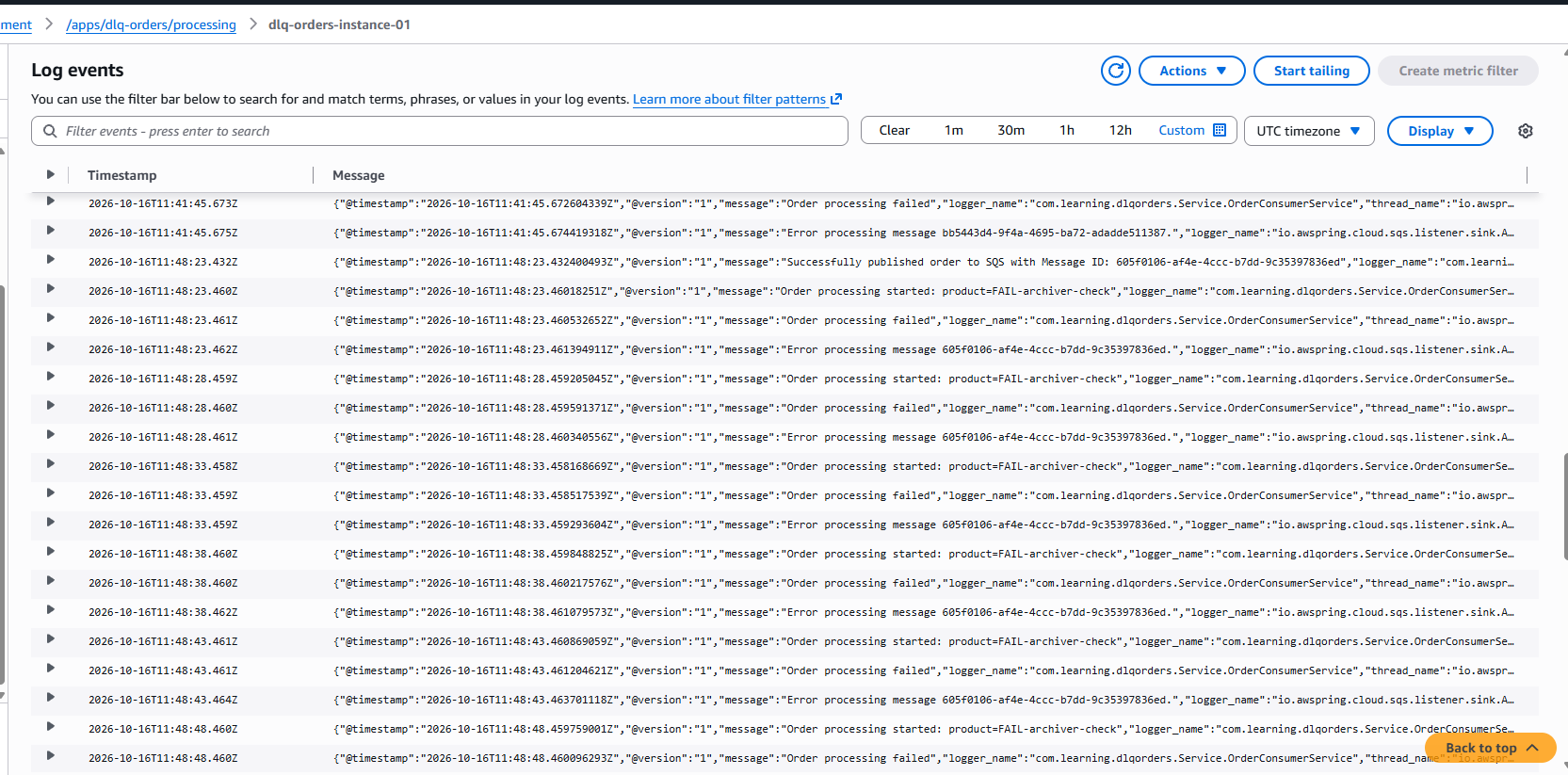
The API saves the order and initiates publication. The listener processes Laptop without triggering the simulated exception. After successful listener processing, the configured acknowledgement path deletes the message. The order’s normal processing logs remain in following cloudwatch log group. it does not need a DLQ failure report.

Failed processing
curl -s -X POST localhost:8095/api/orders \
  -H "Content-Type: application/json" \
  -d '{"productName":"FAIL-archiver-check-2","quantity":1,"price":10}'
The HTTP request is valid, so saving can succeed and HTTP 201 can still be returned. Later, the listener sees FAIL and throws. That delivery is not acknowledged. Subsequent deliveries fail again. SQS eventually transfers the message to order-queue-dlq under the source redrive policy.Then the Lambda funnction triggers and then reads the DLQ message, finds matching CloudWatch logs, writes the report to S3, and allows the successfully archived message to be deleted from the DLQ.
Once messages are received it trigger lambda function to trigger and save the failed records to S3.For these failed logs I have created following S3 bucket. Using these logs in s3 , we can enable the observability for the failed records.

For the failed record , it creates the report.json as follows.

The report.json look like this.
{
  "schemaVersion": 1,
  "orderId": 4,
  "dlqArn": "arn:aws:sqs:REGION:123456789012:example-orders-dlq",
  "originalOrder": {
    "id": 4,
    "productName": "FAIL-archiver-check-2",
    "quantity": 1,
    "price": 10
  },
  "sqsSystemAttributes": {
    "DeadLetterQueueSourceArn": "arn:aws:sqs:REGION:123456789012:example-orders",
    "ApproximateReceiveCount": "11"
  },
  "processingLogCount": 20,
  "errorLogCount": 10,
  "errorLogs": [
    {
      "logStreamName": "example-instance-01",
      "applicationLog": {
        "message": "Order processing failed",
        "level": "ERROR",
        "receiveCount": "1",
        "orderId": "4",
        "stack_trace": "java.lang.IllegalStateException: Simulated processing failure for order 4"
      }
    }
  ]
}
Using this saved logs in S3 , we can return these records to the front-end if we want tracking for failed orders.
.png)
Implementation : https://github.com/malith7597/DLQ-learn