- #claude
- #skill
- #ai automation
A custom skill which I use daily to improve efficiency
How I built a custom Claude skill to fix bugs through a seven-step workflow, combining TDD, manual verification, and code review with AI assistance.
Sep 9, 2026 • 12 min read
Better Bug Fixes with AI
How I built a custom Claude skill to fix bugs through a structured workflow, combining test-first development, manual verification, and code review with AI assistance.
AI is evolving rapidly, and keeping up with new models and tools takes considerable cognitive effort. As software engineers, we also need to figure out how to use these tools effectively in our daily work.
Today, I want to share a custom skill I created in Claude called /fix-ticket. It helps me follow a consistent process when investigating, fixing, and reviewing bugs.
I was assigned to an existing project that I hadn’t been involved in developing. It had a substantial backlog of bugs, alongside new feature requests from the client. The work covered several areas:
-
Technical debt
-
Security audit findings
-
Performance issues
-
Styling issues
-
API defects
To work through this backlog, I created a workflow in Claude. The article groups it into seven stages; the actual skill has eight steps because it separates implementation from build checks and test cleanup.
Before using it, I organized the issues recorded in Trello into a quick-win ledger: a reference document containing ticket details. It wasn’t a complete or finalized list, but it provided useful context for many of the fixes.
The workflow reflects the thought process I want to follow as an engineer: understand the problem, assess its impact, make a focused change, and verify the result.
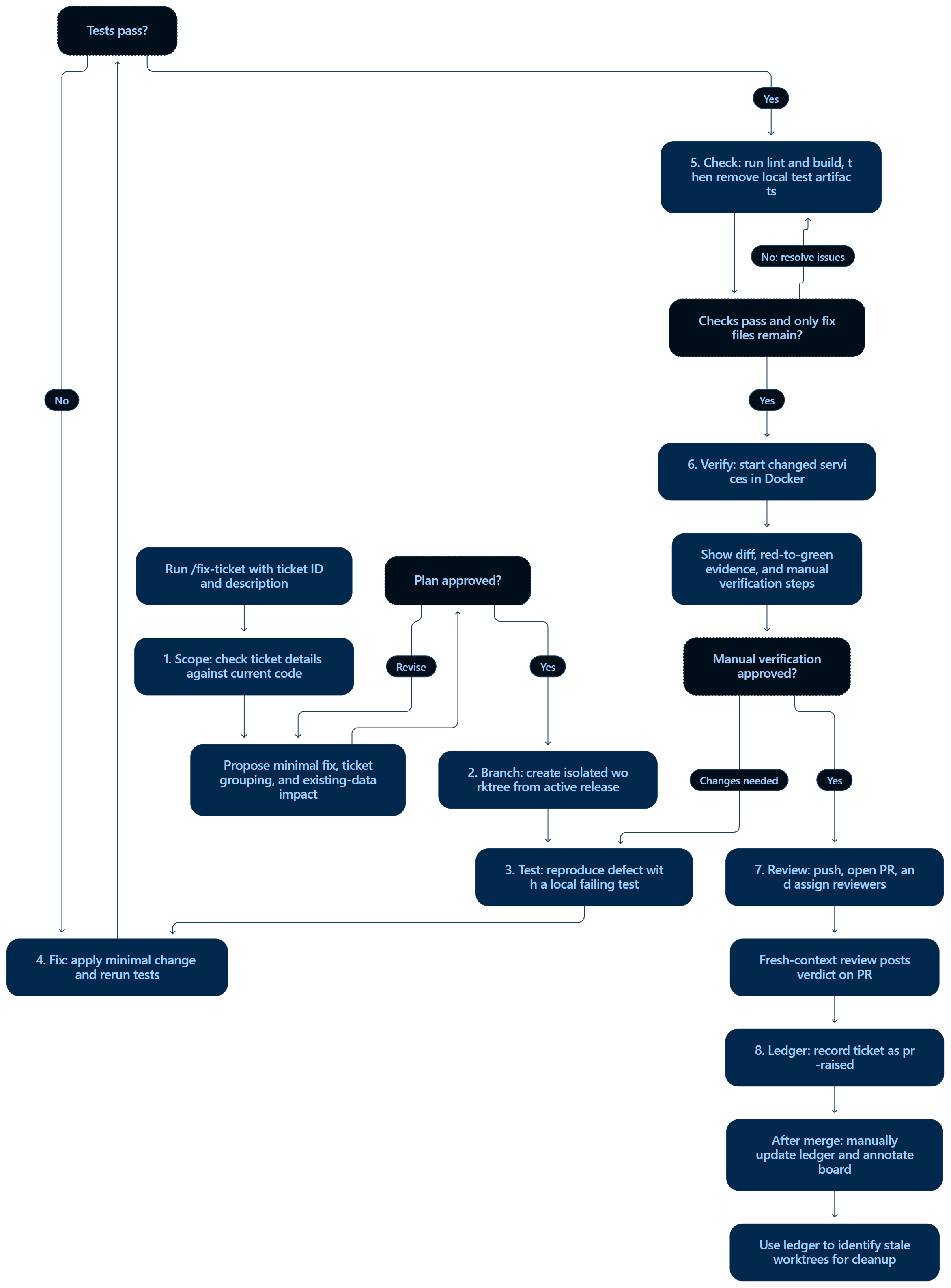
1. Understand the scope and confirm the defect
I invoke the skill like this:
/fix-ticket [ticket-id] [bug-description]
Claude first checks the quick-win ledger for the ticket’s summary, description, expected result, actual result, and references. If the ticket isn’t there, it uses the details I provide. I provide enough detail to make the issue and its expected behavior clear.
It then investigates the current source code, confirms the defect, and proposes the smallest appropriate fix for my review.
A critical part of this step is assessing the impact on existing data. A seemingly small change might require a migration, introduce a new required field, or break compatibility with older records.
Identifying these implications before implementation is one of the most important parts of fixing an existing system.
2. Create an isolated branch and worktree
The project has a separate harness repository containing workflow documentation and a tracker.yml file that identifies the active release branch.
Claude uses this tracker to create a dedicated fix branch and an isolated Git worktree from that release branch.
This lets me work on fixes independently. One practical lesson I learned, though, is that worktrees—and the dependencies and build artifacts inside them—can consume considerable local storage. Cleanup needs to be part of the process.
3. Write a failing test
Before changing the implementation, Claude writes a test that reproduces the defect. The skill shown below specifies Vitest for frontend tests; Java backend fixes need the project’s appropriate test tooling.
For this project, the tests are local-only: they provide red → green evidence but are removed before committing. The PR includes the test output. This is a project-specific tradeoff, since those tests will not provide ongoing regression protection in CI.
The test should fail because of the reported bug. That gives us evidence that we have reproduced the problem and a way to check whether the fix actually resolves it.
4. Apply the fix and run the tests
Claude implements the fix approved during the scope checkpoint, then runs the tests to verify the change.
This follows the familiar red → green cycle: reproduce the defect with a failing test, then make it pass with a focused implementation change. Relevant existing tests, where available, also help check for regressions.
5. Verify the behavior manually
Once the automated checks pass, Claude starts the affected services in separate Docker containers so I can verify the behavior manually.
This gives me a checkpoint to inspect the result, confirm that it meets the expected behavior, and request adjustments before moving forward.
6. Create and review the pull request
After manual verification, Claude creates a pull request against the active release branch. The description explains the root cause, the changes made, and how the fix was verified. It also assigns the configured reviewers.
Claude then reviews the PR from a fresh context and posts its findings as a GitHub comment.
That additional review is useful, but I still treat it as another layer of feedback. Human review remains part of the process.
7. Update the ledger and track cleanup
Finally, Claude records an entry for the ticket in the ledger, keeping the work traceable and making it easier to identify stale worktrees for later removal.
This closes the loop between the original issue, the fix, and the working environment used to implement it.
What I learned
The underlying practices are familiar. TDD is at the core of the implementation cycle, while scoping, isolation, manual verification, review, and cleanup form the wider engineering workflow. The custom skill brings these practices together into a repeatable process with AI assistance.
I also don’t send every bug through /fix-ticket. Sometimes I investigate and implement the fix myself, then ask Claude to review my changes. When I don’t understand a proposed fix, I stop and study the underlying concept before accepting it.
For me, the value of this skill is making good engineering habits easier to repeat while keeping responsibility for the outcome with the engineer.
Workflow:
The actual skill: /fix-ticket
The original skill content is reproduced below as a separate, copyable Markdown block. It includes project-specific paths, placeholders, commands, and standing deviations that need to be checked against your own environment.
/fix-ticket
Right-sized delivery of a small bug/quick-win ticket from the triage backlog, end to
end, against current release/v[X].0.0 source. Slash-only — costs zero context until invoked.
This is the right-sized bug-fix flow (.claude/rules/tracker.md → "Bug Tracking"),
NOT /harness-deliver. No spec authoring, no decomposition, no waves.
Standing deviations on this project (decided by the lead — do not re-ask each run):
- Tests are LOCAL-ONLY. Vitest cases are written + run for red→green evidence but are never committed to any branch or PR — and neither are the test-runner dependencies. This overrides the harness "regression test lives in the repo" gate; the substitute is the red→green output pasted into the PR body. Tradeoff accepted: no CI protection against re-regression.
- Status is tracked by hand in the ledger.
/fix-ticketrecords the ticket up topr-raised. When the PR merges, setstatus: merged+merged_atyourself and re-run the board annotator. No scheduled job.- Verification is containerized (Docker), only the changed service. Step 6 starts the dev server(s) via
/dev/dev-up.sh, which auto-detects the touched repo(s) from the worktrees — no manualnpm run dev/bootRun. Prereqs (one-time): Docker Desktop running;/dev/.envfilled (TTL, images, global Mongo URI); and per-repo env files in/dev/env/(admin.env,website.env,backend.env) copied from the.examples and filled. FE env files are injected into the container;backend.envcarries the CORS allowed-origins. CORS is otherwise avoided by running FEs on fixed ports behind their dev-proxy. Confirm the FE env var names + the backend CORS property name against the repos.
How to Use
/fix-ticket <Ticket Id> <little description>
/fix-ticket <Ticket Id, Ticket Id ...> <little description>     # correlated tickets together
Examples:
/fix-ticket Ticket Id-270 dashboard card copy mismatch
/fix-ticket Ticket Id-270, Ticket Id-447 dashboard wording + naming
$ARGUMENTS = the leading token(s) are the ticket id(s) (comma- or space-separated
<Ticket Id>); everything after is the short description / hint. Run from the workspace parent
(the dir holding harness/ and the code repos). If no ticket id is given, print
this usage and stop.
What it does
Parse $ARGUMENTS into ticket id(s) + description, then execute the loop below. Do NOT use
/harness-deliver, specs, or waves. This is a LIVE PRODUCTION system — every change must
account for existing data (records already in , in-flight applications), not just newly-created records.
Work in order and STOP for my approval at each → CHECKPOINT:
-
SCOPE. Look each ticket up in the triage board (
./quickwin-board.html— parse the embedded JSON ticket array, don't scan the raw HTML) for the symptom. The board was generated against an OLDER tree — the code is now onrelease/vX.0.0, so do NOT trust its line numbers or fix wording. Open the actual current source, confirm the real defect, and derive the minimal fix. If multiple ids were given, say whether they're correlated (touch the same files/surface) and recommend one branch+PR vs stacked branches. State the existing-data impact. → CHECKPOINT: show the derived fix plan + grouping. Wait for approval. -
BRANCH. Read
BASE = delivery.active_release_branchfromharness/tracker.yaml(currentlyrelease/v3.2.0). Create a worktree + branchfix/ticket-id-<short-desc>offBASEunder../worktrees/<id>/<repo>. -
WRITE THE FAILING TEST FIRST (local-only). Before changing product code, install the runner without touching committed files and write the test against current (buggy) code:
npm i -D --no-save vitest @testing-library/react @testing-library/jest-dom jsdom- Put test(s) in a throwaway path
__localtests__/<ticket-id>.test.tsxand any vitest config in a temp file — both will be deleted before commit, never staged. - Include a case built from a representative EXISTING record shape, not only a new one.
npx vitest run __localtests__→ capture the RED output.
-
FIX. Apply the minimal change only. No scope creep. Re-run
npx vitest run __localtests__→ capture the GREEN output. -
CHECK + STRIP TESTS. Run lint + build for the touched repo and paste the output. Then remove all test artifacts and confirm nothing test-related is staged:
- delete
__localtests__/and the temp vitest config;--no-saveleftpackage.json/ lockfile untouched — verify withgit diff --name-only. - HARD ASSERT:
git status --porcelainshows ONLY the product fix file(s). If any test file, config, or dependency change remains, STOP — do not push.
- delete
-
MANUAL VERIFICATION (containerized — only the changed service, no manual start). Start the dev stack for this ticket —
dev-up.shauto-detects which repos to start from the worktrees you created in step 2, so it brings up ONLY the service(s) this fix touches:harness/dev-up.sh --ticket-id -<NNN>It runs on fixed ports (front-end 1 XXXX / front-end 2 XXXX / backend XXXX) so origins match the backend CORS allowlist and the FE dev-proxy targets; it injects each repo's env file from
./env/; and it auto-stops after the TTL (dev-down.sh --ticket-<NNN>to stop early). For a UI-only ticket only the frontend comes up (it talks to the API via its injected env / dev-proxy, so no CORS and no local backend); a backend ticket brings up only the backend on the shared . (Force a set with--repos backendif ever needed.)Then give a numbered manual-verification script against the printed
http://localhost:<port>URL(s): page, clicks, before vs after, with at least one step exercising an EXISTING record. Include exact UI text / screenshots where useful.Backend / non-UI tickets (backend): still START the container —
dev-up.sh --ticketID-<NNN> --repos backendboots Spring against the shared — and verify against the RUNNING service (call the endpoint / actuator / trigger the flow and inspect the result or logs). The "page/clicks" framing is FE-only; for backend, the verification is the live request/response or rendered artifact from the booted app. Do NOT trigger real external side-effects against production (e.g., a real SES send to a live inbox). If a fix genuinely has no bootable surface and only an in-process render/unit test can prove it, that is a DEVIATION from this step — call it out explicitly and ASK before substituting; never silently swap the running-app check for a test and present the step as done.→ CHECKPOINT: show the full diff (fix only), the RED→GREEN test output, the dev-stack URLs (or the explicit, approved deviation), and the verification script. Wait for approval before pushing.
-
REVIEW (separate agent posts to PR). After approval: push, open the PR — title
<Ticket ID > - <message>, baseBASE, reviewers = all teammates except me (<Lead 01>,<Member 01>,<Member 02>,malithminus the author). The PR body MUST include: the ticket link, the manual-verification script, the pasted RED→GREEN local test output, and a one-line note that the test toolchain is not yet adopted so no tests are committed by policy (so the reviewer doesn't flag missing tests as a blocker). Then run/review-pr <pr-number> --commentso a fresh-context agent reviews the diff against the ticket/requirement and posts its verdict as a PR comment. When it asks which spec/plan to bind to, use the ticket text (+<Ticket ID>-plan.mdif one was written). Paste me the posted verdict. -
LEDGER (record up to pr-raised). Append/update an entry per ticket in the fixed-bug ledger
/quickwin-ledger.yaml, keyed byTicket ID:{repo, branch, fix_pr, status: pr-raised, fixed_at: <ISO>, pr_raised_at: <ISO>, merged_at: null, tests: local-only, notes}. Touchtracker.yamllast_updatedunder the tracker lock (flock ./.tracker.lock, fail open if absent). Do NOT edit the board HTML and do NOT setmergedhere. List anything I still do manually.When the PR later merges (run this as a quick follow-up, or it's the only manual step left): set that entry's
status: merged+merged_at, then reflect it on the board:python3 ./scripts/annotate-quickwin-board.py --write(additive — only setsfixed: truefor merged tickets).
For a non-trivial ticket (multi-file/repo, a design choice, real risk): first write a short
plan to ./plans/Ticket-id-plan.md (approach + files + existing-data impact + test
plan) and wait for my approval before step 2.